Code generation
You can use almost any Python data type and also complex values like datetime.date, because repr() is used to convert the values to source code.
The default __repr__() behavior can be customized.
import datetime
from inline_snapshot import snapshot


def something():
    return {
        "name": "hello",
        "one number": 5,
        "numbers": list(range(10)),
        "sets": {1, 2, 15},
        "datetime": datetime.date(1, 2, 22),
        "complex stuff": 5j + 3,
        "bytes": b"byte abc\n\x16",
    }


def test_something():
    assert something() == snapshot(
        {
            "name": "hello",
            "one number": 5,
            "numbers": [0, 1, 2, 3, 4, 5, 6, 7, 8, 9],
            "sets": {1, 2, 15},
            "datetime": datetime.date(1, 2, 22),
            "complex stuff": (3 + 5j),
            "bytes": b"byte abc\n\x16",
        }
    )
The code is generated in the following way:
- The value is copied with
value = copy.deepcopy(value)and it is checked if the copied value is equal to the original value. -
The code is generated with:
- a defined @customize hook which can also be defined by the user.
- or by a fallback
repr(value) - Strings which contain newlines are converted to triple quoted strings.
Note
Missing newlines at start or end are escaped (since 0.4.0).
These changes are part of the update category, which is not reported by default. You can apply all these update changes with
pytest --inline-snapshot=update.from inline_snapshot import snapshot def test_something(): assert "first line\nsecond line" == snapshot( """first line second line""" )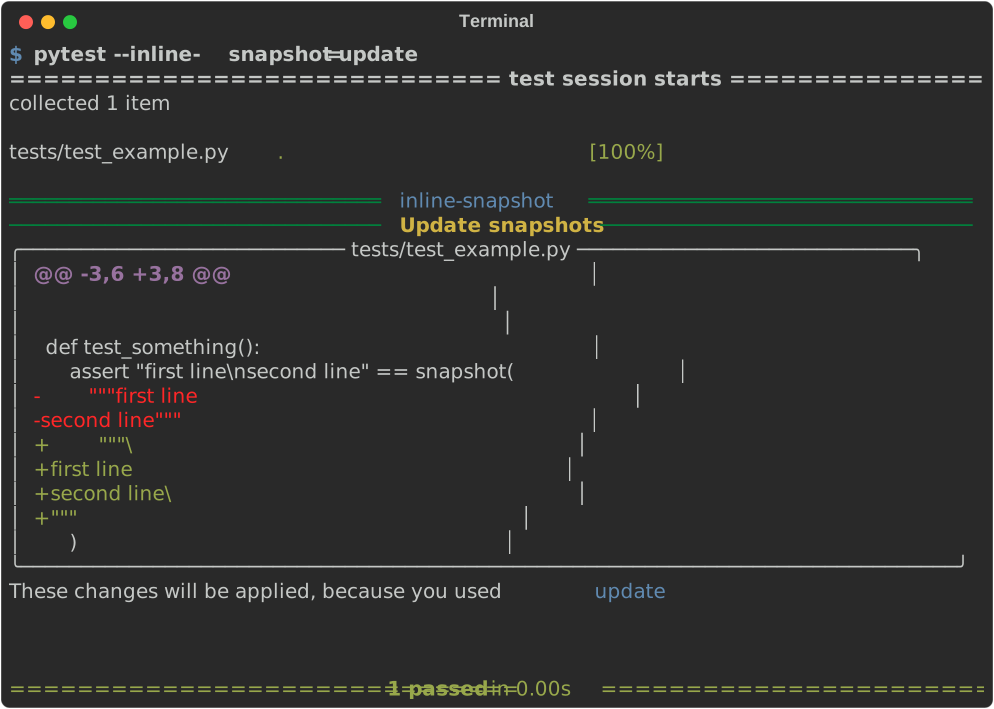
-
The new code fragments are formatted with black if it is installed.
-
The whole file is formatted
-
with black if it was formatted with black before.
Note
The black formatting of the whole file could not work for the following reasons:
- black is configured with cli arguments and not in a configuration file.
Solution: configure black in a configuration file - inline-snapshot uses a different black version.
Solution: specify which black version inline-snapshot should use by adding black with a specific version to your dependencies. - black is not installed. Black is an optional dependency since inline-snapshot v0.19.0
- black is configured with cli arguments and not in a configuration file.
-
or with the format-command if you defined one.
-