






Welcome to inline-snapshot
inline-snapshot is a snapshot testing library that stores values directly in your source code. This makes snapshots easy to read and review, and it saves you time when writing tests. It is also possible to store values in external files when needed.
inline-snapshot is generally designed as a composable library which can be customized by the user. This introduction will give you an overview of all the features.
Let's start with a simple example:
from inline_snapshot import snapshot


def something():
    return 1548 * 18489


def test_something():
    assert something() == snapshot()
You can use snapshot() instead of the value that you want to compare against. Then run the tests with pytest to record the correct values.
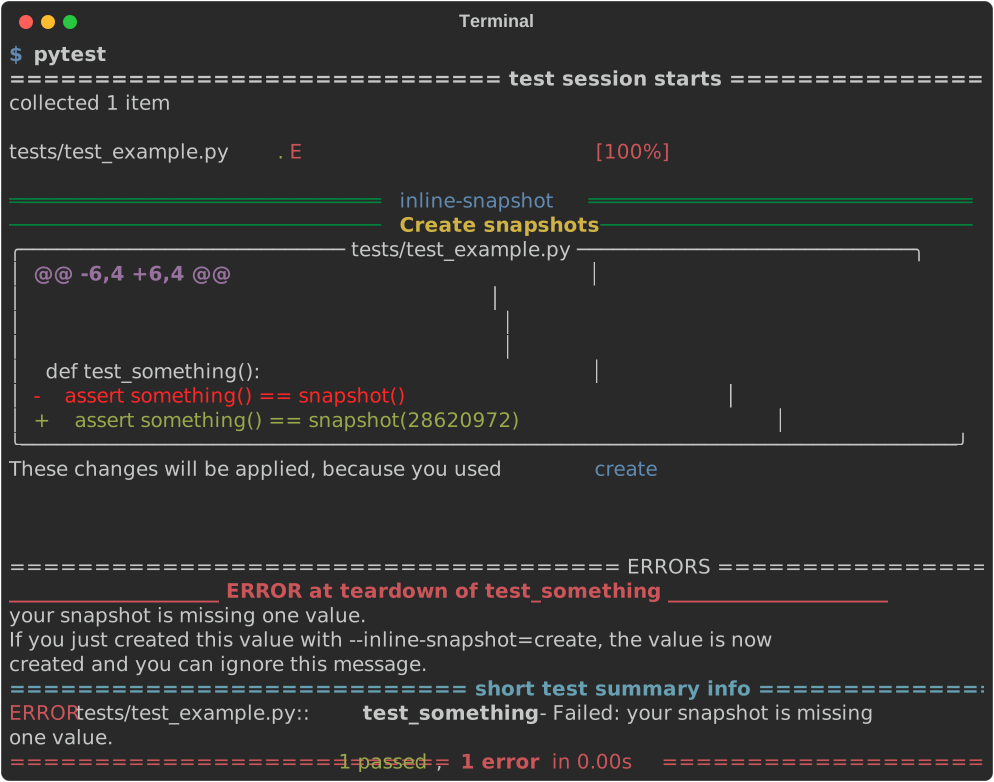
Your tests will fail if you change your code by adding // 18.
Maybe the failure points to a bug that you should fix, or maybe the code is correct and you want to update your test results.
from inline_snapshot import snapshot


def something():
    return (1548 * 18489) // 18


def test_something():
    assert something() == snapshot(28620972)
Changing snapshots is almost as simple as creating them. You can run pytest again, and inline-snapshot will ask whether you want to change the snapshot.
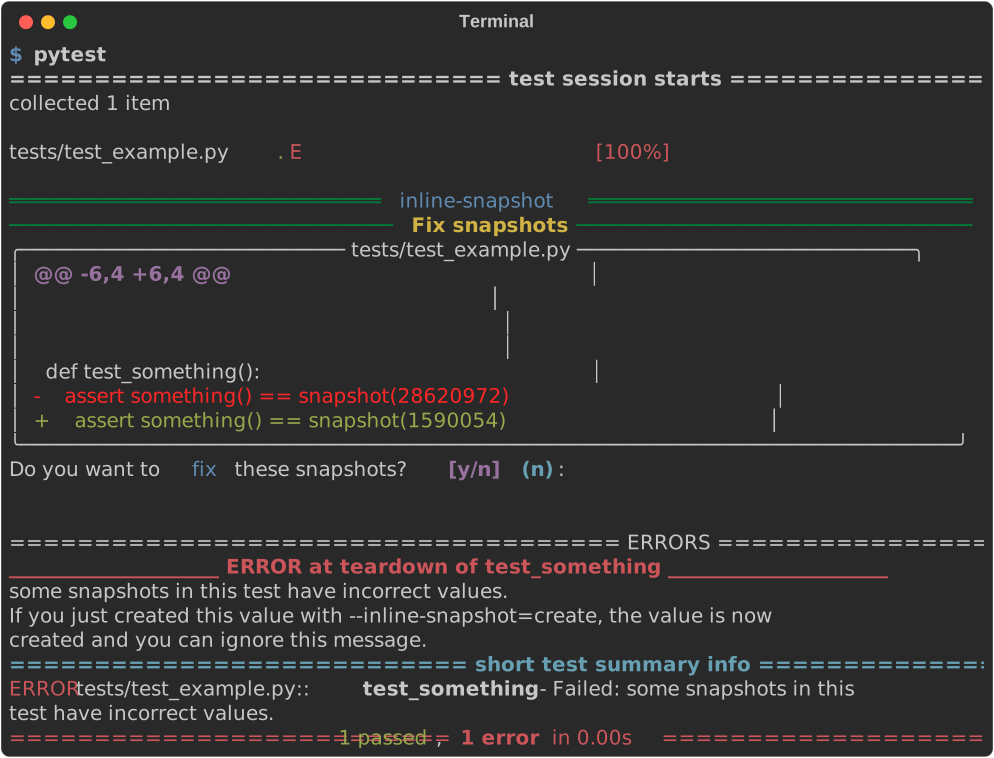
Review these changes carefully so that you do not record the result of buggy code in your tests.
Supported operations
You can use snapshot(x) in assertions with a limited set of operations:
value == snapshot()to compare with something,value <= snapshot()to ensure that something gets smaller or larger over time, such as the number of iterations in an algorithm you want to optimize,value in snapshot()to check if your value is in a known set of values,snapshot()[key]to generate new sub-snapshots on demand.
Warning
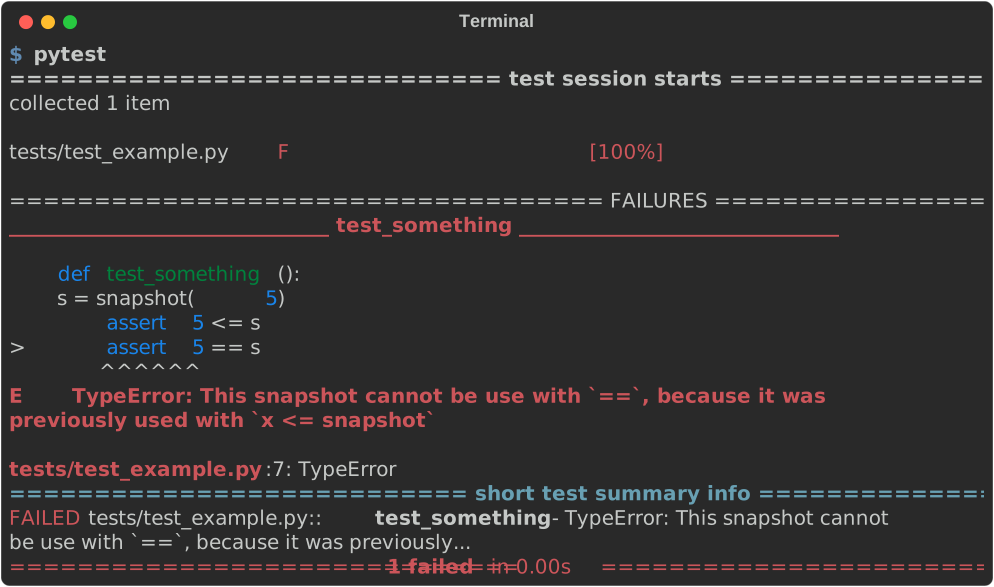
One snapshot can only be used with one operation.
from inline_snapshot import snapshot


def test_something():
    s = snapshot(5)
    assert 5 <= s
    assert 5 == s
This code does not work and creates the following error:
Supported usage
You can place snapshot() anywhere in your tests.
You can reuse one snapshot multiple times when you want to compare with the same value.
You can use snapshot() inside loops:
You can pass snapshot() as an argument to a function:
from inline_snapshot import snapshot


def check_string_len(string, snapshot_value):
    assert len(string) == snapshot_value


def test_string_len():
    check_string_len("abc", snapshot(3))
    check_string_len("1234", snapshot(4))
    check_string_len(".......", snapshot(7))
You can also use snapshot_arg() to convert function arguments into snapshots.
You can use snapshot() as a parameter in pytest.mark.parametrize:
dirty-equals
inline-snapshot has built-in support for dirty-equals. This means that you can replace parts of your snapshot with dirty-equals expressions, and inline-snapshot will preserve these values the next time it changes your snapshot.
from dirty_equals import IsStr
from inline_snapshot import snapshot


def user_response():
    return {"id": "usr_123", "name": "Mia"}


def test_user_response():
    assert user_response() == snapshot(
        {"id": IsStr(regex=r"usr_\d+"), "name": "Mia"}
    )
Here, inline-snapshot can update the "name" field later without replacing the IsStr(...) matcher for "id".
Code generation
inline-snapshot represents your values as source code. You can customize code generation in your conftest.py, or you can write a plugin for specific libraries.
from dataclasses import dataclass


@dataclass
class Money:
    amount: int
    currency: str

    @staticmethod
    def euro(amount):
        return Money(amount, "EUR")
from inline_snapshot.plugin import Builder
from inline_snapshot.plugin import customize
from money import Money


@customize
def money_handler(value, builder: Builder):
    if isinstance(value, Money) and value.currency == "EUR":
        return builder.create_call(Money.euro, [value.amount])
inline-snapshot will then use Money.euro to create the Money type if it has to.
It will also generate the missing imports if needed.
from money import Money
from inline_snapshot import snapshot


def test_total():
    assert Money(12, "EUR") == snapshot(Money.euro(12))
 Insiders
inline-snapshot also has an insiders version for sponsors. Insider features focus on workflow improvements, editor integration, and tooling around inline-snapshot.
These features are designed so that they do not make your tests harder to share. You can still run tests created with the insiders version using the normal open-source version of inline-snapshot.
Sponsoring helps me spend more time on inline-snapshot and related open-source projects. As sponsor goals are reached, insider features are released for everyone.
Insiders can already fix normal assertions that do not use snapshot(), such as:
This is especially useful for existing codebases that do not use inline-snapshot yet. You can learn more about this feature here.
Feedback
inline-snapshot provides some advanced ways to work with snapshots.
I would like to know how these features are used to further improve this small library. Let me know if you've found interesting use cases for this library via 𝕏, fosstodon or in the github discussions.
Sponsors
I would like to thank my sponsors. Without them, I would not be able to invest so much time in my projects.
Silver sponsor 🥈

I have also started to offer insider features for inline-snapshot. I will only release features as insider features if they will not cause problems for you when used in an open source project. I hope sponsoring will allow me to spend more time working on open source projects. Thank you for using inline-snapshot, the future will be 🚀.
Issues
If you encounter any problems, please report an issue along with a detailed description.